Thursday, April 28, 2016

Thursday, April 21, 2016
react redux middlewares
I am going to fully demonstrate to you what is Redux and React and how these guys can be used together
I am going to build a book list application that loads books through a get request and it will display them so that a user can select on a particular book and gets the books details

Below is the structure of my application

I am going to build a book list application that loads books through a get request and it will display them so that a user can select on a particular book and gets the books details
Below is the structure of my application
Components
These are the react basic units they generally can receive props and these props can be of data values of various data types or functions
These are the react basic units they generally can receive props and these props can be of data values of various data types or functions
Here is a normal React Component
Book that has two properties
- Title
- Pages
import React from "react";

const Book = (props) => {

    return (


Details for:

Title: {props.title}

Pages: {props.pages}

);
};
Book.propTypes = {
    title: React.PropTypes.string.isRequired,
    pages: React.PropTypes.number.isRequired


}

export { Book as default }
The above Book component gets all its data from the book details containerBookListComponent
import React from "react";

const BookList = (props) => {

    function renderList(){

        console.log(props.books.map)
        return props.books.map((book) => {
            return (
 props.selectBook(book)}
                    className="list-group-item">
                    {book.title}

);
        });
    }

    return (

            {renderList()}

);
};


export { BookList as default }
Containers
Since we are using Redux these are regarded as cool components since they are able to interact with the redux and can pass to and fro dataBookDetailContainer
import React, { Component } from 'react';
import { connect } from 'react-redux';
import Book from '../components/Book'

class BookDetail extends Component {

}

function mapStateToProps(state) {
    return {
        title: state.activeBook.title,
        pages: state.activeBook.pages,
    };
}

export default connect(mapStateToProps)(Book);
BookListContainer
  import React, { Component } from 'react';
 import { connect } from 'react-redux';
 import { selectBook } from '../actions/index';
 import { bindActionCreators } from 'redux';
 import BookList from '../components/BooksList'

 class BookListContainer extends Component {
 }

 function mapStateToProps(state) {
   return {
     books: state.books.books
   };
 }

 function mapDispatchToProps(dispatch) {

   return bindActionCreators({ selectBook: selectBook }, dispatch);
 }

 export default connect(mapStateToProps, mapDispatchToProps)(BookList);
Action Creators
These are the gate keepers ,they dispatch actions that are being sent to all the reducers
An action coontains a type and payloadimport ajaxRequest from './AjaxRequest'
const ROOT_URL = `/Books.json`;
export function selectBook(book) {
// selectBook is an ActionCreator, it needs to return an action,
// an object with a type property.
return {
type: 'BOOK_SELECTED',
payload: book
};
}
export function loadBooks(books) {
return {
type: 'Fetch_Books',
payload: books
};
}
export const fetchBooks = () => {
return (dispatch, getState) => {
const addBooks = (books) => {
dispatch(loadBooks(books))
}
const onFetchError = (error) => {
console.log(error)
}
ajaxRequest(ROOT_URL, "GET", addBooks, onFetchError)
}
}
Reducers
They recieve actions and they do mondify the stateimport { combineReducers } from 'redux';
import availableBooks from './reducer_books';
import ActiveBook from './reducer_active_book';
const rootReducer = combineReducers({
books: availableBooks,
activeBook: ActiveBook
});
export default rootReducer;
// Active BOOKS REDUCER
const intialState={
title:'',
pages:0,
}
export default function(state = intialState, action) {
switch(action.type) {
case 'BOOK_SELECTED':
return action.payload;
}
return state;
}
// Available BOOKS REDUCER
import R from 'ramda'
const initialState = {
books:[]
}
const availableBooks = (state = initialState, action) => {
switch (action.type) {
case 'Fetch_Books':
return R.merge(state, {books:action.payload});
default:
return state;
}
}
export default availableBooks ;
Middle Wares
These reside between the actiomn creators and the reducers .Meaning that they will carry out computations and that results can be added to the payload before the action reaches the reducers
Here is our custom ajax request file and index.js// AjaxRequests
export default (url, method, onSuccess, onFailure) => {
var xmlhttp = new XMLHttpRequest();
xmlhttp.onreadystatechange = () => {
if (xmlhttp.readyState == XMLHttpRequest.DONE) {
if (xmlhttp.status >= 200 && xmlhttp.status < 300) {
try {
onSuccess(JSON.parse(xmlhttp.responseText));
} catch (error) {
onFailure(error)
}
} else {
onFailure(xmlhttp.error);
}
}
};
xmlhttp.open(method, url, true);
xmlhttp.send();
};
// INDEX.JS
import React from 'react';
import ReactDOM from 'react-dom';
import { Provider } from 'react-redux';
import { createStore,applyMiddleware } from 'redux';
import {fetchBooks} from '../src/actions/index'
import thunkMiddleware from 'redux-thunk'
import App from './components/app';
import reducers from './reducers';
let store = createStore(reducers,applyMiddleware(thunkMiddleware))
ReactDOM.render(
, document.querySelector('.container'));
store.dispatch(fetchBooks)
Thursday, April 14, 2016
REDUX REACT MOCHA
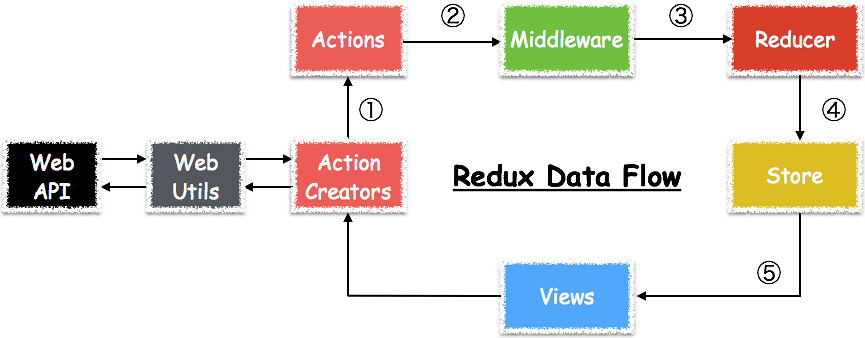
I will start by saying this out that redux is not an independent framework but its a library that can be used with react
So what does redux do it handles the complicity of store management
I will start by describing these terms
So what does redux do it handles the complicity of store management
I will start by describing these terms
- Container
Redux users regard containers as smart react component . Meaning they contain both react and redux
- Action creators
They receive actions from the containers and they dispatch actions to the reducers
- Reducers
They do take in actions and they do check if the action type matches with what they can handle and they return out a new state . Meaning that they do carry out computations and they update the state
Lets get our hands dirty !!!!!!!
We will start installing redux
Explanation :
Lets get our hands dirty !!!!!!!
We will start installing redux
npm install --save react-redux

npm install --save-dev redux-devtools
Entry point
This is the first part that will be accessed when ever the web page request

import React from 'react'
import { render } from 'react-dom'
import { Provider } from 'react-redux'
import { createStore } from 'redux'
import todoApp from './reducers'
import App from './components/App'

let store = createStore(todoApp)

render(


  ,
  document.getElementById('root')
)
Explanation :
Friday, April 1, 2016
working with react
react under construction will be uploading a version soon

React (sometimes styled React.js or ReactJS) is an open-source JavaScript library providing a view for data rendered as HTML. React views are typically rendered using components that contain additional components specified as custom HTML tags.
Its is so powerful in building single page web application.
Lets get started
We going to use weback in this tutorial
Lets start by add react to our dependencies to npm

React (sometimes styled React.js or ReactJS) is an open-source JavaScript library providing a view for data rendered as HTML. React views are typically rendered using components that contain additional components specified as custom HTML tags.
Its is so powerful in building single page web application.
Lets get started
We going to use weback in this tutorial
Lets start by add react to our dependencies to npm
$ npm install --save react react-dom babel-preset-react
$ webpack
whats a React Component class
These are user custom made user blocks that are represented in an xml format and during the implementation
of that xml format react changes them into html format
import React from 'react';
import ReactDOM from 'react-dom';


 module.exports = React.createClass({


       render: function() {
           return
Type the Zombie name below

{this.props.data}
;
       }
  });
Wednesday, March 16, 2016
Beginners setup nodejs,weback
After hours and hours of trying to understand the relationship between nodejs ,webpack and not to forget to mention that its one of the assignments given to us at interactive frontend development course at university of tartu
We are going to perform the following tasks
- node installation
- npm project setup
- webpack
$ sudo apt-get update
$ sudo apt-get install nodejs
Npm project set up
$ mkdir project-name
$ cd project-name
$ npm init
By doing this a node project will be set and now it time to start doing some cool stuff
Webpack installation
webpack is a module bundler and takes modules with dependencies and generates static assets representing those modules.

$ npm i webpack --save-dev
Other dependencies required in our project Babel installation
$ npm install --save-dev babel-cli
Domready
$ npm i domready --save-dev
open the package.json file and update it
   {
  "name": "project-name",
  "version": "1.0.0",
  "description": "",
  "main": "main.js",
  "scripts": {
    "test": "echo \"Error: no test specified\" && exit 1",
    "start": "webpack-dev-server "
  },
  "author": "akaiz",
  "license": "MIT",
  "dependencies": {
    "babel": "^6.5.2",
    "babel-preset-es2015": "^6.6.0",
    "webpack": "^1.12.14",
    "webpack-dev-server": "^1.14.1"
  },
  "devDependencies": {
    "babel-core": "^6.7.2",
    "babel-loader": "^6.2.4",
    "domready": "^1.0.8"
  }
}
create main.jsvar Dance=require('./dance.js')
var dance = new Dance(['salsa','break dance','texas']);
var custom = require('./custom.js');
var domready = require("domready");
domready(function () {
custom.setbackground;
});
For this project this is going to be our entry point in this project
create dance.js"use strict";
class Dance {
constructor(dancelist){
var dance = Math.floor(Math.random()*dancelist.length);
console.log('Your random dance is: ' + dancelist[dance]);
};
}
module.exports = Dance;
its really nice that we can now use "class" in ECMAScript
create custom.jsvar domready = require("domready");
domready(function () {
var myfunction=function(){
location.reload();
}
var change = document.getElementById('back');
change.style.backgroundColor = 'green';
var myButton = document.createElement("input");
myButton.type = "button";
myButton.value = "Refresh to get a new Dance";
myButton.onclick=myfunction;
change.appendChild(myButton);
exports.setbackground = change;
});
I use domready because i wanted to update the content of my Dom dynamically how ever this can be still done in other ways
finally index.html
    Title


You think you can dance whats is in the console
You can see that in my index.html i provide a script from the src of bundle.js . This file will be automatically be generated and continously it will contain all content from all your javascript files so that you no longer need to trouble your self by importing plenty of script files into you page
To run the project type the following command$ npm start
One of the cool thing about webpack that when ever i make a modification in my javascript files it will automatically regenerate the new bundle.js file
Bravo Bravo


Subscribe to:
Posts (Atom)